
Introduction to Digital Forensics
Digital forensics is the science of identifying, preserving, analyzing, and presenting digital evidence for legal or investigative purposes. As our lives move increasingly online, digital forensics has become essential for criminal investigations, civil litigation, corporate internal investigations, and incident response.
The field combines computer science, law, and investigative techniques. Digital forensics professionals must understand file systems, operating systems, network protocols, and memory structures — all while maintaining strict adherence to evidence handling procedures that ensure findings are admissible in court.

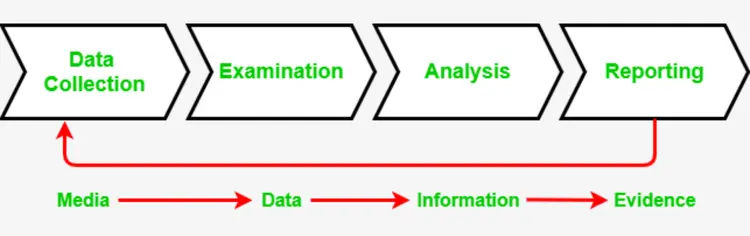
1. The Forensic Process
Digital forensics follows a structured process to ensure evidence integrity and admissibility.
2. Evidence Collection and Chain of Custody
Proper evidence collection is the most critical phase. Errors at this stage can make evidence inadmissible.
Order of Volatility
Evidence should be collected in order of volatility (most volatile first):
- 1. CPU, cache, registers: Most volatile, lost on power loss
- 2. RAM (Memory): Lost on reboot
- 3. Network state: Active connections, routing tables
- 4. Running processes: Active programs
- 5. Disk storage: Persistent data
- 6. Backup media: Least volatile
Chain of Custody Requirements
- Documentation: Every transfer of evidence must be recorded
- Seals: Evidence bags sealed with tamper-evident tape
- Hash Verification: Cryptographic hashes (MD5, SHA-256) to verify integrity
- Access Log: Who accessed the evidence and when
# Generate forensic hash for evidence integrity
sha256sum evidence.dd > evidence.hash
md5sum evidence.dd >> evidence.hash

# Verify integrity before analysis
sha256sum -c evidence.hash

# Create forensic image with dd
dd if=/dev/sda of=evidence.dd bs=4096 conv=noerror,sync
3. Disk Forensics
Disk forensics involves analyzing storage devices to recover deleted files, identify artifacts, and reconstruct user activity.

File System Analysis
- FAT/NTFS: Windows file systems — MFT analysis, alternate data streams
- ext4/XFS: Linux file systems — inode analysis, journal recovery
- HFS+/APFS: macOS file systems — file system journal, snapshots
Key Forensic Artifacts
- Deleted Files: Recovery from unallocated space
- File System Metadata: MAC times (Modified, Accessed, Created, Changed)
- Slack Space: Hidden data between file end and cluster end
- Alternate Data Streams (ADS): Hidden data in NTFS
- Registry Analysis: Windows configuration, user activity, USB device history
# Autopsy / The Sleuth Kit commands
# List files in disk image
fls -r evidence.dd

# Recover deleted file by inode
icat evidence.dd 12345 > recovered_file.txt

# Analyze MFT (Master File Table)
istat evidence.dd 0

# Registry analysis with RegRipper
regripper -r SYSTEM -f system > system_report.txt
Forensic Tools
- Autopsy / The Sleuth Kit: Open-source forensic platform
- EnCase: Commercial forensic suite
- FTK (Forensic Toolkit): Comprehensive analysis tool
- X-Ways Forensics: Advanced forensic analysis
- Magnet AXIOM: Multi-device forensics
4. Memory Forensics
Memory forensics analyzes RAM captures to reveal running processes, network connections, encryption keys, and malware artifacts that may not be present on disk.

- WinPmem: Windows memory acquisition
- LiME (Linux Memory Extractor): Linux memory capture
- Mac Memory Reader: macOS memory acquisition
- FTK Imager: Memory acquisition and disk imaging
# Volatility memory analysis commands
# Identify OS profile
volatility -f memory.dump imageinfo

# List running processes
volatility -f memory.dump --profile=Win10x64 pslist
volatility -f memory.dump --profile=Win10x64 psscan  # Hidden processes

# List network connections
volatility -f memory.dump --profile=Win10x64 netscan

# Dump process memory
volatility -f memory.dump --profile=Win10x64 memdump -p 1234 -D ./dump

# Extract malware (hollow process detection)
volatility -f memory.dump --profile=Win10x64 malfind

# Extract encryption keys (BitLocker, TrueCrypt)
volatility -f memory.dump --profile=Win10x64 truecryptsummary
Memory Forensics Findings
- Running Processes: Including hidden and terminated processes
- Network Connections: Active and recently closed connections
- Malware Artifacts: Process injection, rootkits, kernel modules
- Encryption Keys: BitLocker, TrueCrypt, encrypted volumes
- Passwords and Credentials: Plaintext passwords in memory
- Command History: PowerShell, cmd, bash commands
5. Network Forensics
Network forensics involves capturing and analyzing network traffic to identify malicious activity, data exfiltration, and command-and-control communication.
# Capture network traffic with tcpdump
tcpdump -i eth0 -w capture.pcap -s 0

# Capture with rotation (1GB files)
tcpdump -i eth0 -w capture_%Y%m%d_%H%M%S.pcap -C 1000 -W 100

# Analyze with Wireshark/TShark
tshark -r capture.pcap -Y "http.request" -T fields -e ip.src -e http.request.uri

# Extract files from HTTP traffic
tshark -r capture.pcap --export-objects http,extracted_files
Network Forensic Analysis
- Protocol Analysis: HTTP, DNS, SMTP, FTP, SMB traffic
- Flow Analysis: NetFlow, IPFIX for metadata analysis
- Malware Traffic: C2 communication patterns, beaconing
- Data Exfiltration: Large outbound transfers, DNS tunneling
- Reconstructed Sessions: Rebuilding web pages, emails, files
6. Mobile Forensics
Mobile devices contain vast amounts of evidence — call logs, messages, location data, app usage, and social media activity.

Mobile Forensics Challenges
- Encryption: Full-disk encryption (iOS, Android)
- Lock Screens: PIN, pattern, biometric authentication
- Warrant Requirements: Legal authorization needed
- Cloud Data: Evidence may be in cloud, not on device
- Rapid Changes: Frequent OS updates
Mobile Forensic Tools
- Cellebrite UFED: Industry standard for mobile extraction
- Magnet AXIOM: Mobile and computer forensics
- Oxygen Forensics: Mobile device extraction
- Autopsy with Android modules: Open-source mobile analysis
7. Malware Analysis
Understanding malware behavior is crucial for incident response and attribution.
| Analysis Type | Description | Tools |
|---|---|---|
| Static Analysis | Examining code without execution | IDA Pro, Ghidra, strings, PEview |
| Dynamic Analysis | Executing malware in sandbox | Cuckoo Sandbox, ANY.RUN, Process Monitor |
| Code Analysis | Reverse engineering and decompilation | dnSpy (.NET), JD-GUI (Java), OllyDbg |
| Memory Analysis | Analyzing malware in memory | Volatility, Rekall |
# Static analysis basics
strings suspicious.exe | grep -i "http"
strings suspicious.exe | grep -i "cmd"

# Extract resources
peview suspicious.exe

# Dynamic analysis with Process Monitor
procmon -Minis -AcceptEula -BackingFile procmon.pml

# Network monitoring during execution
tcpdump -i any -w malware.pcap
8. Incident Response and Forensics
Incident response combines forensic analysis with containment, eradication, and recovery.
- Create forensic images before any remediation
- Document all actions with timestamps
- Preserve memory before shutdown
- Capture network traffic during investigation
- Maintain chain of custody for all evidence
9. Anti-Forensics and Countermeasures
Understanding anti-forensics helps investigators recognize when evidence has been tampered with.
- Data Destruction: Secure deletion, wiping tools, physical destruction
- Encryption: Full-disk encryption (BitLocker, FileVault, VeraCrypt)
- Steganography: Hiding data within images, audio, video
- Timestomping: Altering file timestamps
- Log Wiping: Deleting or modifying log entries
10. Legal Considerations and Expert Testimony
Digital forensics findings often appear in court. Investigators must understand legal requirements.
Admissibility Requirements (Daubert/Frye)
- Methodology must be scientifically valid
- Tools must be tested and accepted in the field
- Procedures must be documented and repeatable
- Expert qualifications must be established
Expert Testimony Preparation
- Clear, non-technical explanations for juries
- Visual aids to illustrate findings
- Understanding of opposing expert challenges
- Documentation of all steps and decisions
11. Cloud Forensics
Cloud environments present unique forensic challenges due to multi-tenancy, ephemeral resources, and provider access limitations.
- Shared Responsibility: Provider retains access to infrastructure
- API Forensics: CloudTrail, Azure Monitor, GCP Audit Logs
- Snapshot Analysis: Forensic images of cloud volumes
- Container Forensics: Ephemeral containers require different approach
# AWS CloudTrail analysis
aws cloudtrail lookup-events --lookup-attributes AttributeKey=Username,AttributeValue=suspicious-user

# Capture EC2 forensic snapshot
aws ec2 create-snapshot --volume-id vol-1234567890 --description "Forensic snapshot"

# Share snapshot for analysis
aws ec2 modify-snapshot-attribute --snapshot-id snap-12345 --attribute createVolumePermission --operation-type add --user-ids 123456789012
12. Forensic Certifications and Career Path
- GCFE (GIAC Certified Forensic Examiner): Foundational forensics
- GCFA (GIAC Certified Forensic Analyst): Advanced incident response
- GNFA (GIAC Network Forensic Analyst): Network forensics
- GREM (GIAC Reverse Engineering Malware): Malware analysis
- CFCE (Certified Forensic Computer Examiner): IACIS certification
- EnCE (EnCase Certified Examiner): EnCase certification
Conclusion
Digital forensics is both an art and a science — requiring technical expertise, investigative skills, and unwavering attention to procedure. From the moment evidence is collected to its presentation in court, every step must be documented, validated, and defensible.
As technology evolves, forensic investigators must continuously learn new file systems, devices, and attack techniques. The principles of proper collection, chain of custody, and thorough analysis remain constant, even as the tools and technologies change.